iPhone set up

iPhone set up
Please note: iPhone/iPad only works with websites with Flash alternatives, to be able to view on the iPhone/iPad you may need to download relevant Apps from iTunes, access to the Apps are restricted to the location your itunes account is registered, Please try the following links to ensure you can download the Apps before proceeding.
http://itunes.apple.com/gb/app/bbc-iplayer/id416580485?mt=8 (BBC)
http://itunes.apple.com/gb/app/itv-player/id446079916?mt=8 (ITV)
http://itunes.apple.com/gb/app/4od-catch-up/id432494037?mt=8 (4oD)
http://itunes.apple.com/gb/app/demand-5/id456000021?mt=8 (Demand 5)
http://itunes.apple.com/gb/app/sky-go/id446086440?mt=8 (Sky)
US TV
http://itunes.apple.com/us/app/nbc/id442839435?mt=8
http://itunes.apple.com/us/app/abc-player/id364191819?mt=8
http://itunes.apple.com/us/app/pbs/id410053365?mt=8
http://itunes.apple.com/us/app/the-cw-full-episodes/id445551370?mt=8
-
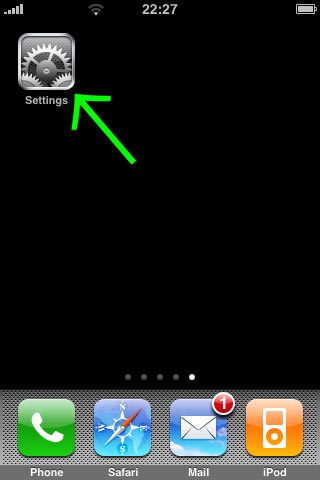
Open "Settings" on your iPhone / iPad.
-
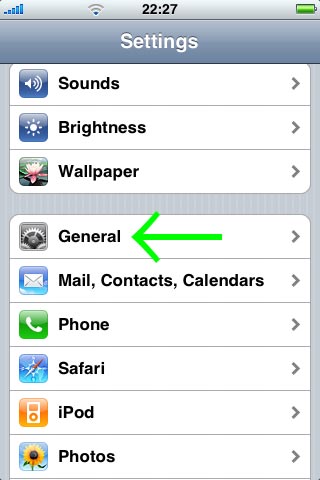
Click on "General".
-
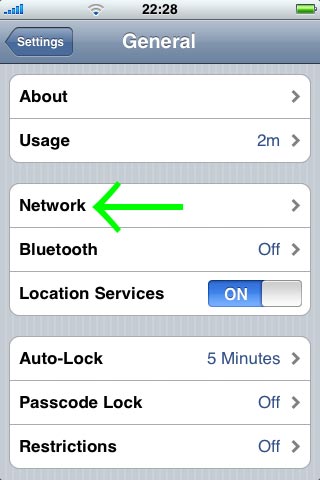
Click on "Network"
-
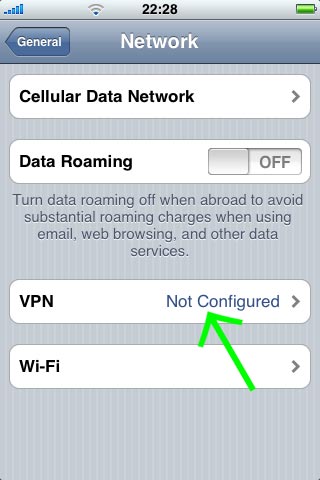
Click on "VPN"
-
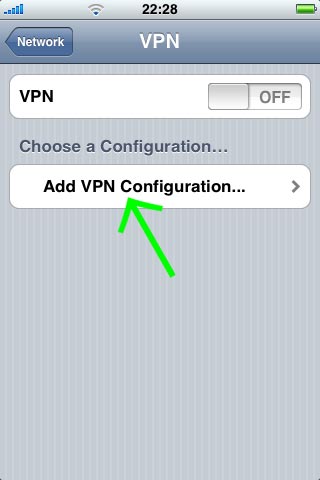
Click on "Add VPN Configuration"
-
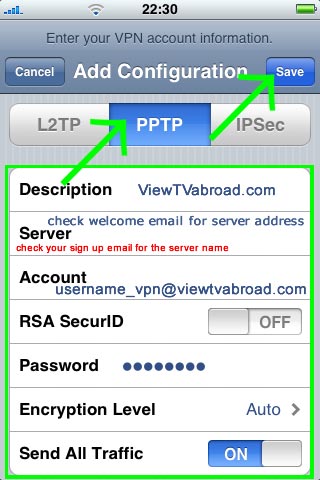
Now select "PPTP". Enter "ViewTVabroad.com" in the "Description" field. Then enter the VPN server address as a "Server" (this is detailed in your welcome email). Enter your ViewTVabroad Account details - your User name and Password that was sent to you. Enable "Send All Traffic" and save all settings by clicking on the "Save" button.
-
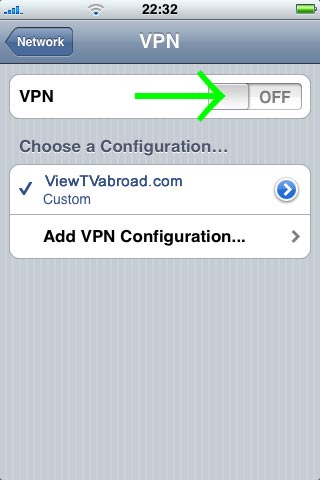
Your VPN setting is now ready. When you switch on the "VPN" swich, your ViewTVabroad connection will be established.
-
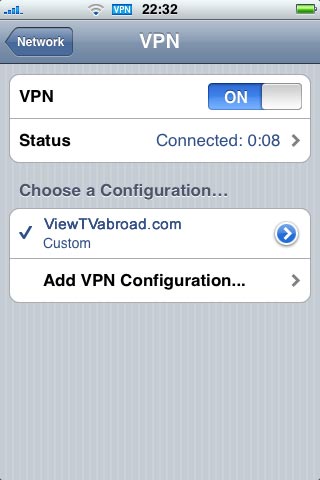
All Complete
-
You can now start watching UK & US TV by selecting channels and services form the channels page. Remember - to Watch UK TV you must set up and be connected to the UK server and to Watch US TV you must set up and be connected to the US server.
Living abroad, travelling, working away on business or on holiday?
Don't want to miss out on your favourite TV? View TV Abroad makes watching UK & USA TV, live or on demand, wherever you are, easy & accessible, using your TV, laptop, PC, Mac, Android, iPhone or iPad..
Subscribe Now