D-Link DIR 100 Router - VPN set up
D-Link DIR 100 Router - VPN set up
-
Open the router's web configuration page and log in as admin. Default IP address of router is 192.168.0.1.
-
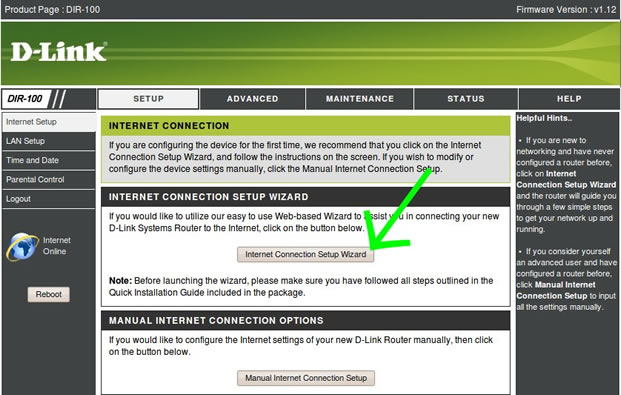
At the HOME screen click on Internet Connection Setup Wizard.
-
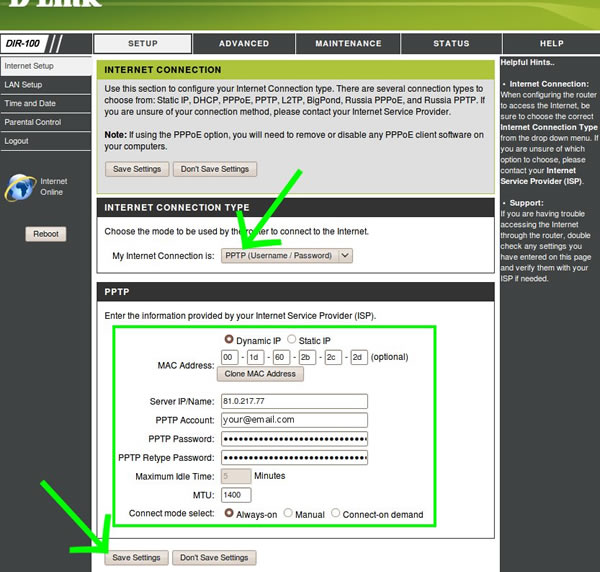
Select My Internet Connection is PPTP (Username / Password). Set Server IP address (contact us for server address to use), Username, Password and click "Always On". Click Save Settings.
-
You should see PPTP connected in status page. (You can test if your IP has changed at whatismyip.com)
-
You can now start watching UK & US TV by first making sure you are connected to one of the UK servers (for UK TV) or one of the US servers (for US TV) and then selecting channels and services form the channels page.
Living abroad, travelling, working away on business or on holiday?
Don't want to miss out on your favourite TV? View TV Abroad makes watching UK & USA TV, live or on demand, wherever you are, easy & accessible, using your TV, laptop, PC, Mac, Android, iPhone or iPad..
Subscribe Now